
Website support
Organize website customer messages in Telegram
GramDesk is suitable for small business websites, landing pages, service providers, consultants and agencies that need to receive website questions without installing a heavy live chat widget. Visitors click a Telegram contact button or bot link on your website, GramDesk routes each message to a private Telegram support group and creates a separate topic for every visitor, while your team replies directly inside Telegram.
To set it up, you need a Telegram bot, a private support group, enabled topics, required bot permissions, a GramDesk connection and a visible contact link or button on your website. Pricing is $0.10 per active bot per day, about $3 per bot per month, with unlimited teammates included and no per-agent fees. If you need 24/7 staffed live chat, SLA routing, advanced automation, deep analytics, visitor tracking or full ticket lifecycle management, a traditional live chat or helpdesk platform may be a better fit.
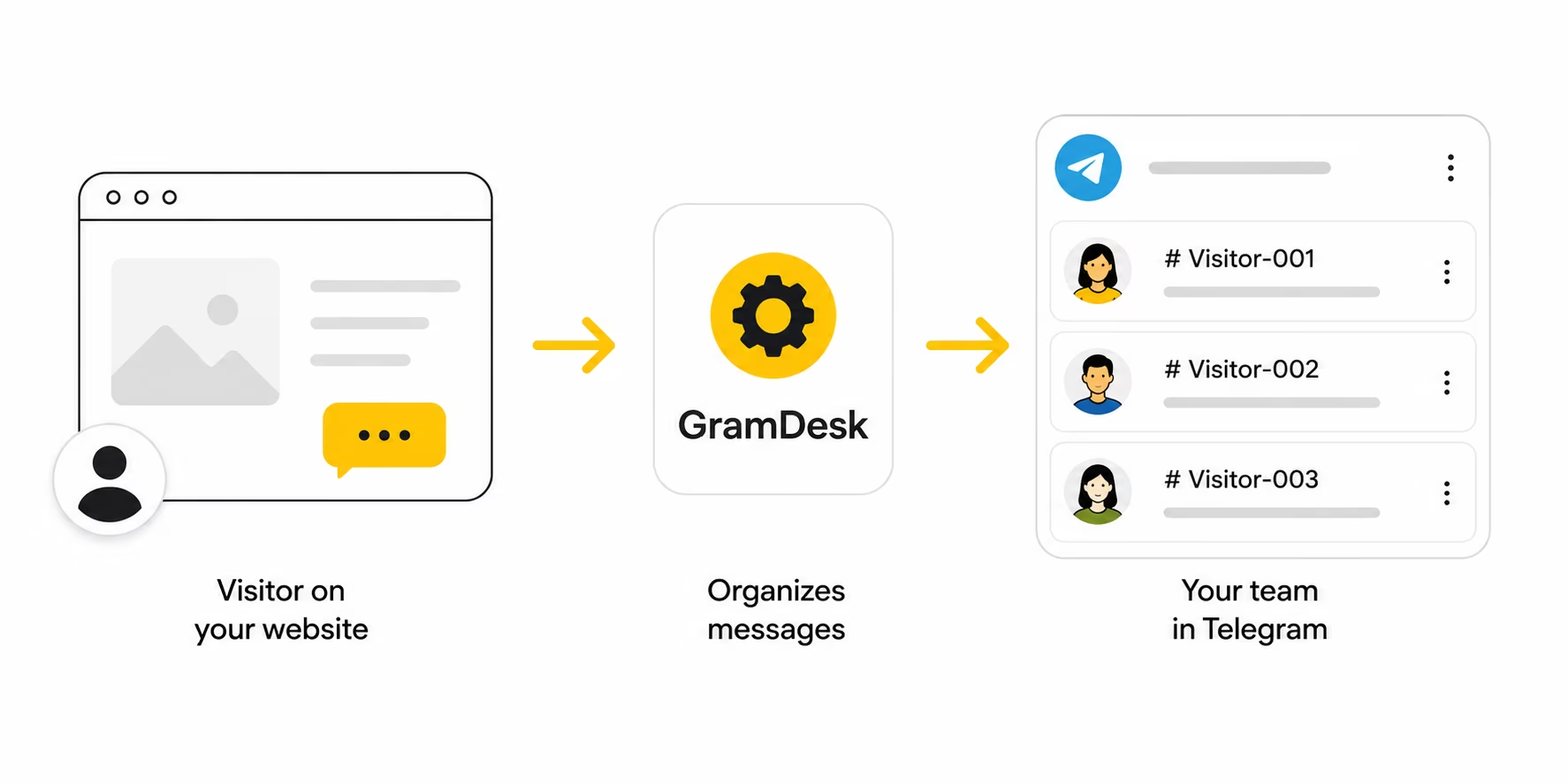
Workflow visual
From website click to Telegram reply
Button click
Private topic
Team reply
Visitor answer
Add the button where visitors already look, then test the full message flow before you send traffic to it.
Quick summary
Best for
Small business websites, landing pages, consultants, agencies and service providers that want Telegram-based customer support.
Main task
Turn website questions into organized Telegram conversations instead of scattered contact form emails or personal chats.
How it works
Visitor clicks a contact button or bot link, GramDesk opens a private topic and the team replies from Telegram.
What you need
A Telegram bot, a private support group, enabled topics, the right bot permissions and a visible website contact link.
Cost
$0.10 per active bot per day, about $3 per bot per month. Unlimited teammates are included, with no per-agent pricing.
Not enough for
24/7 staffed live chat, SLA routing, deep analytics, visitor tracking, complex automation or full ticket lifecycle management.
Why website messages get lost
Contact forms delay the answer
A visitor fills out a form and then waits for email. If the reply lands in the wrong inbox, the lead goes cold before anyone notices.
Personal chats hide the history
When website messages land in personal Telegram accounts, screenshots and handoffs make it hard for another teammate to continue the conversation.
Live chat can be too heavy
Small teams often do not need a full live chat stack, per-agent billing or another dashboard just to answer pre-sale questions.
How GramDesk works for website support
A customer sends a website question, GramDesk turns it into a private Telegram conversation and your team can reply without switching tools.
Visitor clicks the contact link
A website visitor taps a Telegram button or bot link from the page, hero, contact section or footer.
GramDesk opens a private topic
The message arrives in the shared support group as a separate conversation for that visitor.
Your team replies inside Telegram
Anyone on the team can see the thread and answer without leaving the private workspace.
The reply goes back to the visitor
GramDesk sends the answer to the same chat, so the conversation stays in one place.
How to receive website messages in Telegram with GramDesk
Set up the contact path on your website first, then connect the bot and test the full visitor flow before launch.
Choose where visitors should click
Put the Telegram contact button or bot link where people already decide: hero, header, contact page, pricing page, booking page, footer or sticky mobile bar.
Create a Telegram bot
Use the bot as the public entry point. Visitors contact the bot, not a personal Telegram account.
Create a private support group
Invite the people who should reply. Keep the group private so customer messages stay internal.
Enable topics and permissions
Turn on Telegram topics and give the bot the permissions it needs to create and manage customer threads.
Connect GramDesk
Link the bot and the private support group inside GramDesk so each incoming message becomes an organized topic.
Publish the website button
Add the contact link or button to the website and make it easy to spot on desktop and mobile.
Test the full customer flow
Send a real test message, confirm that a topic appears, reply from Telegram and verify that the answer reaches the visitor.
Test the full customer flow before you publish. Send one real test message from the live website, confirm that GramDesk creates a topic, reply from Telegram and make sure the answer reaches the visitor.
Is GramDesk right for your website?
Use GramDesk when you want simple Telegram-based website support. Choose a larger live chat or helpdesk stack when you need heavy routing and staffed coverage.
GramDesk is a good fit when
- Small business websites with pre-sale questions
- Landing pages that need a simple contact path
- Consultants and agencies that want one shared inbox
- Service providers that answer from Telegram every day
- Teams that want unlimited teammates without per-agent fees
A traditional platform is better when
- 24/7 staffed live chat coverage
- SLA routing and complex ticket queues
- Deep analytics, visitor tracking and reporting
- Advanced automation and full ticket lifecycle management
- Teams that want a complete CRM/helpdesk stack
Website support options compared
Contact forms and live chat are useful in some cases, full helpdesk tools are powerful, and GramDesk is the lightweight Telegram middle.
Contact form
Setup
Easy to add, but replies usually land in email and context gets fragmented.
Best for
Very low-volume websites that only need a basic form.
Trade-off
Slow handoff and no shared inbox for the team.
Live chat widget
Setup
Useful when someone is online to watch the chat, but it adds another support dashboard.
Best for
Teams that need live operator coverage on the website.
Trade-off
Usually more overhead and per-seat cost than a Telegram workflow.
Full helpdesk / CRM
Setup
Powerful for routing, automation and analytics, but much heavier to configure.
Best for
Larger support teams with deeper workflows and reporting needs.
Trade-off
More expensive and more complex than a small website usually needs.
GramDesk
Setup
Connect a bot, private support group and topics, then add a visible website contact link.
Best for
Small teams that want a simple Telegram support inbox.
Trade-off
Lightweight on purpose. Not a full enterprise helpdesk.
Simple pricing for website support
Start with one bot for your website and invite the whole team without paying per agent. GramDesk is priced per active bot, not per support operator.
$0.10 / active bot / day
≈ $3 / bot / month
Unlimited teammates included. No per-agent pricing.
Unlimited teammates included
No per-agent pricing
Shared Telegram inbox
Simple setup
Related guides and use cases
Continue with setup, pricing and related GramDesk workflows.
Setup and pricing
Useful guides
FAQ
Quick answers for website support workflows.
Can I receive website messages without installing live chat software?
Yes. Add a Telegram contact button or bot link and route website questions into GramDesk instead of a live chat widget.
Where should I place the website contact button or link?
Put it where visitors already decide: hero, header, contact page, pricing page, booking page, footer or a sticky mobile bar.
What do I need to set it up?
You need a Telegram bot, a private support group, enabled topics, the required bot permissions, a GramDesk connection and a visible website contact link.
Can multiple teammates answer website messages?
Yes. Everyone replies inside the same private Telegram group, so the conversation context stays visible for the whole team.
How much does GramDesk cost?
GramDesk costs $0.10 per active bot per day, about $3 per bot per month. Unlimited teammates are included and there are no per-agent fees.
Will customers see my personal Telegram account?
No. Customers contact the bot or link on your website, while your team replies inside the private support group.
Is GramDesk a full live chat platform?
No. GramDesk is a lightweight Telegram support inbox for small teams, not a full live chat stack with staffed coverage, SLA routing and deep visitor tracking.
When is GramDesk not enough?
If you need 24/7 staffed live chat, complex ticket queues, deep analytics, advanced automation or a full CRM/helpdesk workflow, a traditional platform may fit better.
Should I test the full customer flow after setup?
Yes. Send a real test message from the live website, confirm a topic appears, reply from Telegram and make sure the answer reaches the visitor.
Turn website customer messages into one Telegram support inbox
Connect your bot, add the website button and let your team reply from one private Telegram workspace without a heavy live chat widget.