
Telegram support for local business is a practical way to handle customer messages without giving out personal Telegram accounts, without losing conversations in private chats and without forcing a small team into a heavy CRM too early. Customers write to a business bot, while the team replies from a private Telegram group where every conversation stays visible, organized and easy to continue.
For many local businesses, customer support does not start as a separate “support department.” It starts with everyday questions from real customers. Someone wants to book a table, ask about a delivery, check whether a service is available, send a photo, confirm an address, reschedule an appointment, ask a price or continue a previous conversation. These messages are simple but important, because each one can turn into an order, a booking, a repeat visit or a lost customer.
The problem is that communication in a local business usually grows faster than the team’s internal process. At first the owner answers everything personally. Then an administrator helps. Then another employee starts replying to customers. Soon customers begin writing directly to different people. After a while, nobody has the full picture. Some messages get a fast reply. Others are forgotten. Some customers have to repeat the same details because the conversation history lives inside another employee’s personal Telegram account.
A Telegram-based support setup gives a small team a cleaner way to work. The business gets one public contact point for customers, and the team gets one private workspace to reply from. The experience stays simple for the customer, while the team gets just enough structure to avoid the chaos.
Why local business support becomes messy
Local businesses usually do not receive one predictable type of message. A restaurant can get questions about tables, delivery, the menu, allergens, takeaway, opening hours and order problems in a single day. A salon can get appointment requests, reschedules, price questions and requests for a specific specialist. A repair shop can get photos, technical questions, address details and status requests. A laundry can get pickup requests, delivery questions and order updates.
Each individual message is easy to answer. The difficulty appears when messages arrive for different people, on different devices and in different chats.
One customer writes to the owner because they have the owner’s personal Telegram. Another customer writes to an employee. A third customer writes through a link on the website. Someone sends a photo in one chat and then continues the conversation in another. If an employee is offline, the rest of the team may not even know that a customer is waiting.
This creates several common problems.
The owner loses visibility. The team does not always know who already replied. The customer history is locked inside personal accounts. Work messages mix with private chats. A new employee cannot help because they do not see the previous context. And if someone leaves the company, important customer communication can leave with them.
For a local business, this is not just an internal inconvenience. It affects revenue directly. A customer who does not get a fast reply can choose another café, another salon, another cleaning company, another repair shop or another local provider.
Why a full CRM is often too much at the beginning
A CRM can be useful for many businesses, but it is not always the right first step for a small local team. A CRM usually brings pipelines, deal stages, tasks, forms, fields, reports, user roles and automation rules. These tools are valuable when a business already has a structured sales process, but they can feel too heavy when the immediate problem is simpler: customer messages are scattered.
Many local businesses do not need a complex sales funnel on day one. They need to reply faster, share context between teammates, stop using personal accounts for work communication and keep customer conversations in one place.
This is why a Telegram support bot can be a better first layer. It does not try to replace every business tool. It organizes the most urgent communication problem without changing the environment the team already works in. The team keeps using Telegram, but the business communication becomes more controlled and visible.
Later, if the company needs advanced reporting, structured sales management or integrations, it can add CRM tools. But the first step should be to stop losing customer messages.
What Telegram support looks like for a local business
A simple Telegram support setup has two sides.
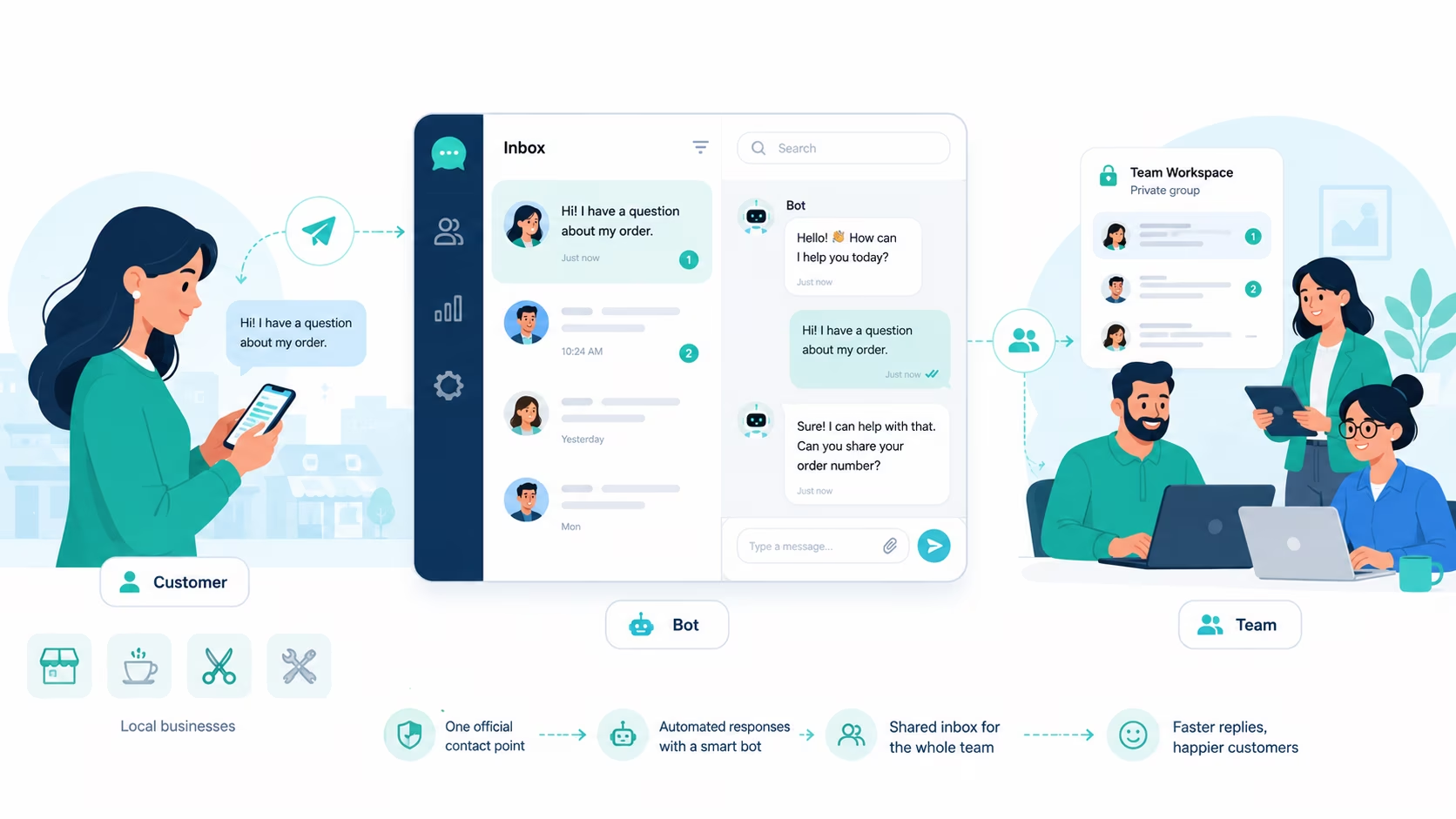
On the customer side, people write to the business bot in Telegram. They do not need to join a group, install a new app, create an account or know the owner’s personal username. They simply open the bot and send a message.
On the team side, the business connects that bot to a private Telegram group. When a customer writes to the bot, the message appears inside the group as a separate customer conversation. Team members can read the context and reply. The customer receives the answer from the business bot, not from an employee’s personal account.
This creates a shared inbox inside Telegram. For the full local business scenario, see our local business Telegram support use case.
The customer sees a normal conversation with the business. The team sees a more manageable internal workspace where several people can help without forwarding screenshots, copying messages or asking who already replied.
This is especially useful for small teams where the owner, administrator, manager and employees need visibility, but nobody wants to spend the day inside a separate help desk platform.
The core idea: one public contact point, one private team workspace
The main value of Telegram support for local business is separation.
The public side stays simple. Customers write to one official business bot in Telegram. That bot can be linked from the website, social profiles, the business profile, printed materials, QR codes, booking pages or order confirmation messages.
The private side stays controlled. Only the team is inside the support group. They see incoming conversations, discuss them internally when needed and reply from the same shared workspace.
This separation solves a common problem: the business can be available on Telegram without exposing personal accounts. Customers do not need to know exactly who is on shift. Employees do not need to use their personal Telegram identity as the official business contact. The owner does not lose visibility when someone else replies.
For local business customer support, this is often already enough to create a much better process.
Which local businesses can use Telegram support
Telegram support works best for businesses where customers ask practical questions often and expect a human reply.
Restaurants and cafés can use it for table requests, menu questions, delivery details, takeaway, opening hours and order follow-ups. A café does not always need a large support platform, but it does need to avoid missed messages during busy hours. This restaurant-specific workflow is covered in more detail in our Telegram support for restaurants and cafés guide.
Beauty salons, barbershops and wellness studios can use it for appointments, reschedules, price questions, specialist availability and reminders. The administrator can answer common questions, while the owner or a senior specialist can step in when needed.
Laundries and dry cleaners can use Telegram for pickup requests, delivery updates, price questions and order status. Customers often ask short questions, but the team needs context because the same customer can have several active or recurring orders.
Repair shops and technical services can use Telegram when customers send photos, describe a problem, ask for an estimate or check whether a device, appliance, bicycle, car part or other item is ready.
Cleaning companies and home service teams can use Telegram for requests, addresses, scheduling, property details, photos, instructions and follow-up questions. The administrator can collect information, while field workers can clarify details when needed.
Small shops, showrooms and local retailers can use Telegram for stock questions, product availability, delivery options, pickup times and after-sales support. For the shop-specific workflow, see Telegram support for shops.
Clinics, studios and appointment-based services can use Telegram for general questions, schedule questions and non-sensitive communication, while keeping internal visibility for the team.
The common pattern is simple: if customers send messages and more than one person on the team may need to reply, a shared Telegram inbox helps.
Why not just use a personal Telegram account?
A personal Telegram account can work when the business is very small and one person answers everything. But it becomes fragile as soon as more people join the process.
The first problem is visibility. If customers write directly to one employee, the rest of the team does not see those conversations. The owner cannot quickly check what was promised, which price was discussed or whether the customer got a reply.
The second problem is continuity. If the employee is busy, sick, on vacation or no longer works at the business, the customer relationship can stay locked in a private chat. Another person can only reply if the conversation is forwarded manually, and forwarded messages rarely show the full context.
The third problem is personal boundaries. Many employees do not want customers writing to their personal Telegram at any hour. They may also not want their username, photo or activity status to be part of the support process.
The fourth problem is trust. The customer should feel that they are talking to the business, not to a random private person. A business bot provides a clearer official contact point.
A Telegram support bot solves these problems by moving the customer conversation into a channel controlled by the business, while the team keeps working in Telegram.
How a shared Telegram inbox helps the owner
For the owner or manager, the biggest benefit is control without micromanagement.
The owner does not need to answer every message personally, but can still see what is happening. They can check whether customers are getting replies, step into important conversations, notice recurring questions and understand where the team needs clearer scripts or rules.
This matters for local businesses because customer communication often reveals operational problems. If many customers ask the same question, the website may not explain the service clearly enough. If customers frequently ask about the address or delivery area, that information should probably be more visible. If customers complain about slow replies, the team may need a clearer schedule or division of responsibility.
A shared inbox makes these patterns easier to see, because the conversations are not scattered across personal accounts.
How it helps employees
For employees, a shared Telegram support flow removes uncertainty.
They can see whether the customer already got a reply. They understand the context before they answer. They can ask a manager to step in inside the team group. They do not need to forward screenshots from personal chats or remember every detail from memory.
This is especially useful when several people work in different shifts. The morning employee can see what happened yesterday. The evening employee can continue a conversation that started earlier. The owner can review important requests without asking each person separately.
It also makes onboarding new team members easier. A new person can learn from real conversations and understand how the business replies to customers.
How it helps customers
For customers, the main benefit is that the business feels faster and more consistent.
They do not need to guess which employee to contact. They do not need to repeat the same information to several people. They can return to the same Telegram bot and continue the conversation.
From the customer’s point of view, the process is simple: write to the business and get a reply. The team’s internal structure does not concern them.
This simplicity matters. Local business customers usually do not want a ticket number, a portal login or a complicated form. They want a fast answer.
Example workflow: restaurant or café
A customer opens the café’s Telegram bot and asks whether there is a table for four people tonight.
The message appears in the team’s private group. The administrator checks availability and replies with two possible times. The customer chooses one. Later, another employee can open the same conversation and see that the booking has already been discussed.
If the customer writes again to change the time, the team does not need to search through personal chats. The conversation is already in the shared support workspace.
This workflow is simple, but it prevents a common local business problem: one employee accepts a request, another does not know about it, and the customer receives conflicting information.
Example workflow: salon or appointment-based service
A customer writes to the salon’s bot and asks about an appointment with a specific specialist. The administrator sees the request in the team group, checks the schedule and offers available slots.
The customer asks the price and sends a photo for context. The administrator can answer basic questions and ask the specialist to look at the photo if needed. The specialist can reply in the same customer conversation or guide the administrator internally.
For the customer, it looks like a single smooth conversation. The team gets shared context and does not need to move the conversation between personal accounts.
Example workflow: repair or local service business
A customer sends a photo of a broken item and asks whether it can be repaired. The message goes to the team group. The administrator collects basic information, while the technician looks at the photo and suggests the next step.
Later, when the customer asks about the status, any team member can see the history and continue. The customer does not need to explain the problem again.
For repair shops, cleaning teams, delivery and other local services, this continuity matters because the customer request often includes details, photos and scheduling. The dedicated guide to Telegram customer support for service businesses shows how to qualify these requests without pretending that Telegram replaces dispatch, estimates or job management.
What to prepare before setting up Telegram support
Before creating a support bot, the business should define the purpose of the channel.
It is better to start with a clear use case. For example: customer questions, bookings, service requests, delivery updates, order status or questions coming from the website. Trying to handle every possible process from day one can make the workflow messy again.
The business also needs to decide who should be in the private support group. This usually includes the owner, administrator, manager and employees who may need to reply to customers. Not everyone has to reply, but the right people should be able to see the context.
It also helps to prepare simple internal rules. Who replies first? When should a manager step in? What information should be requested from the customer? Which questions are better handled by phone? Which answers should not be given without approval?
These rules do not need to be complicated. The goal is not bureaucracy. The goal is to make sure customers get consistent answers.
What information should customers send?
A Telegram support bot can work even without forms, but the team should know what information to request.
A restaurant can request the date, time, number of guests and a name for the booking.
A salon can request the service type, preferred date, specialist and whether the customer has visited before.
A repair shop can request the item type, a description of the problem, a photo and the area or address.
A cleaning company can request the area, the size of the property, the preferred date and the type of cleaning.
A laundry can request the pickup address, delivery preference and order details.
The bot does not need to collect all of this automatically from day one. Even a team replying manually works better when it has a simple checklist for common requests.
Where to place the Telegram bot link
The support bot link should be where customers already look for ways to contact the business.
The first place is the website. The bot link can be added to the contact section, header, footer, service pages and pages related to booking. If the business gets a lot of mobile traffic, the Telegram contact button should be easy to find on the phone. If the website is already a major source of customer questions, the business should also think about how to organize website customer messages before they get scattered across personal chats.
The second place is social media. Local businesses often use Instagram, Facebook, TikTok or local directories. The Telegram bot can be placed as a contact option in the profile or on a links page.
The third place is the business profile in maps and local listings, if Telegram is part of the normal customer contact flow.
The fourth place is printed materials. QR codes can be added to menus, receipts, flyers, business cards, delivery packaging, signs at the reception desk or in the waiting area.
For restaurants, cafés, salons, laundries and local services, QR codes are especially useful, because customers often interact with the business offline first and then continue the conversation in messages.
When Telegram support is enough
Telegram support is often enough when the business has a small team, receives customer messages every day and needs to stop losing conversations.
For a broader small business support workflow, see our guide to customer support for small business.
It is enough when the main tasks are answering questions, confirming bookings, collecting request details, scheduling, sending simple updates and keeping the team aligned. It is also enough when the team already uses Telegram internally. There is no need to train everyone on a new system just to answer basic customer messages.
A shared Telegram inbox is especially useful for businesses that do not yet have a dedicated support manager. It gives the team a shared process without forcing the owner to build a full support department.
When the business may need more than Telegram support
A Telegram support bot is not a full replacement for every customer support or sales system.
If the business needs detailed sales pipelines, automatic lead scoring, advanced analytics, SLA control, call center routing, complex permissions, multichannel support across many platforms or deep integrations with accounting and inventory, then a dedicated CRM or help desk may be necessary.
But this does not mean Telegram support is useless. It can still work as the first layer of customer contact. Customers write to the bot, the team handles simple questions, and the business decides later which conversations need to move into a CRM.
For many local businesses, the practical sequence is: first centralize the messages, then add complexity only when the workflow truly requires it.
Common mistakes to avoid
The first mistake is using the owner’s personal Telegram as the main business contact for too long. It feels convenient at first, but it creates dependence on one person and makes it harder for the team to help.
The second mistake is adding too many people without clear responsibility. A shared group is only useful when the team knows who should reply and when.
The third mistake is treating Telegram support as a place for random internal discussions. The private group should stay focused on customer conversations and related decisions. If the team needs a separate general chat, it should be kept separate.
The fourth mistake is hiding the bot link. If customers cannot easily find the Telegram contact, they will keep writing to personal accounts or other channels.
The fifth mistake is expecting automation to fix an unclear process. A bot can organize communication, but the business still needs basic rules for replies, escalation and responsibility.
How to start with GramDeskBot
A local business can start with a simple setup.
Create a Telegram support bot for the business. Connect it to a private Telegram group for the team. Add the people who should see and reply to customer conversations. Place the bot link on the website, social media and offline materials. Start using it as the main Telegram contact for customer questions. If you need a step-by-step setup flow, follow the setup guide.
This gives the business a cleaner workflow without forcing the team to adopt a large CRM from day one.
Customers get one official Telegram contact. Employees get a shared place to reply. The owner keeps visibility. Conversations stay connected to the business instead of scattered across personal chats.
GramDeskBot is built for exactly this small-team workflow: customer messages arrive through a Telegram bot, while the team handles them from a private group.
To see the product scenario for local teams, open the Telegram support for local business use case and choose the setup that fits your team. You can also check pricing if you want to understand which plan fits your support volume.
FAQ
Can a local business use Telegram for customer support?
Yes. A local business can use Telegram for customer support by giving customers a business bot instead of an employee’s personal Telegram account. Customers write to the bot, while the team replies from a private Telegram group where the conversations stay visible and organized.
Is Telegram support enough for a small business?
Telegram support is often enough when the business mainly needs to answer questions, confirm bookings, collect request details, send simple updates and keep the customer history in one place. If the business later needs complex reporting or sales automation, it can add a CRM on top.
Do customers need to join a Telegram group?
No. Customers do not need to join any group. They write directly to the business bot. The private group exists only for the team, so internal work stays separate from the customer experience.
Can several teammates answer the same customer?
Yes. Several teammates can see the customer conversation inside the private support group and step in when needed. This helps the business avoid missed messages and makes it easy to continue a conversation when one person is unavailable.
Is this better than giving customers a personal Telegram account?
For business communication, yes. A support bot separates work from personal chats, gives the business control over the customer history and lets more than one person help without sharing personal accounts.
What types of local businesses can use this setup?
Restaurants, cafés, salons, laundries, repair shops, cleaning teams, home service companies, small shops, clinics, studios, rental services and concierge teams can use Telegram support when customers regularly ask questions in messages.
Does a Telegram support bot replace a CRM?
Not always. A Telegram support bot is best for organizing customer communication and helping a small team reply from one shared workspace. A CRM may still be needed for complex sales pipelines, reporting, automation and integrations.
Where should a local business place the Telegram bot link?
The bot link can be placed on the website, the contact page, service pages, social profiles, the business profile, receipts, menus, flyers, QR codes and offline materials. The goal is to make the bot the easiest official Telegram contact for customers.
Next steps for a clearer inbox
If messages are already falling through personal chats, start with how to stop losing customer messages in Telegram. To compare a shared inbox with personal chats, groups and a CRM, read how a shared Telegram inbox works for a small team. Clinics that handle pre-visit administrative questions can also use the dedicated dental clinic Telegram workflow.