
WhatsApp in Telegram
Reply to customers from WhatsApp and Telegram in one place
Let customers message you on WhatsApp while your team replies from one private Telegram group. GramDesk connects both sides, keeps every conversation organized, and helps small teams avoid switching between apps.
Customers stay in WhatsApp. Your team works from Telegram.
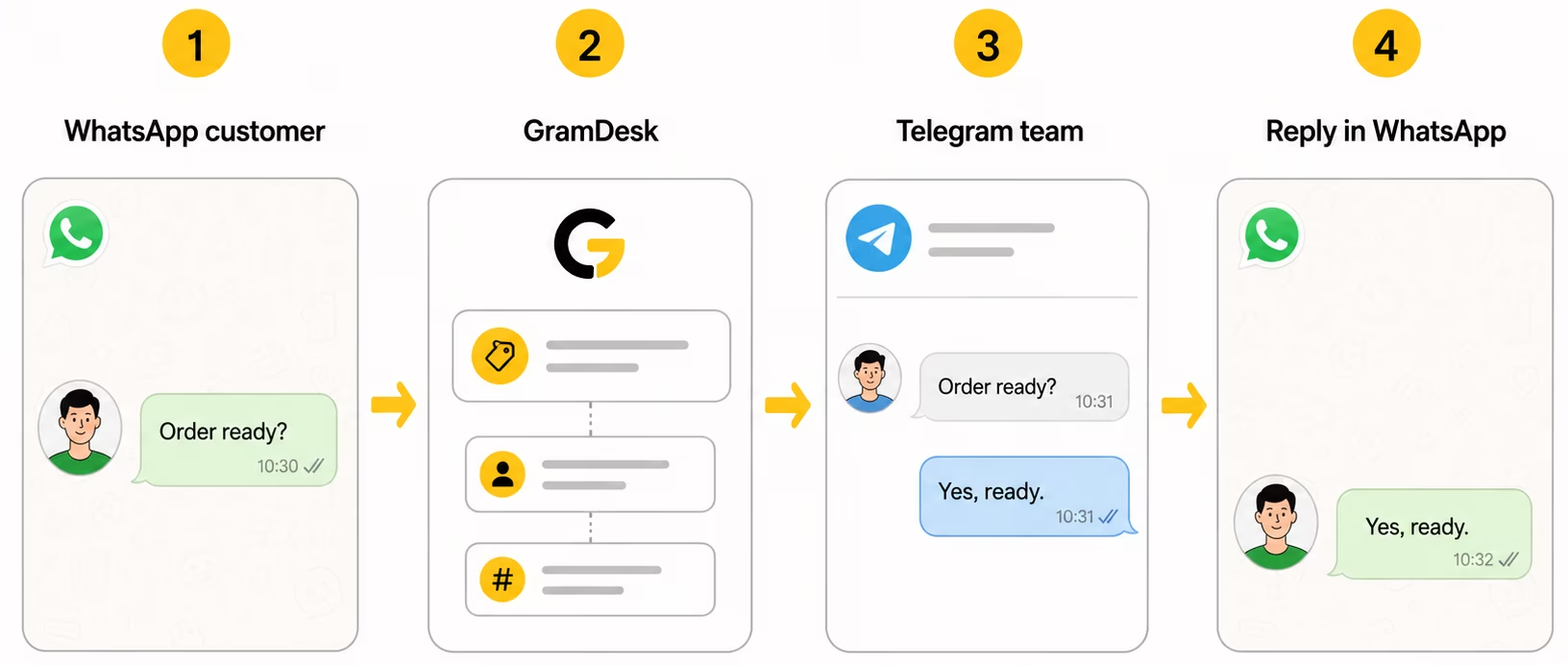
When support happens in several channels, context gets lost quickly. One customer writes in WhatsApp, another message is discussed in Telegram, and part of the history stays in screenshots or personal chats.
GramDesk connects both sides: customers keep using WhatsApp, while your team replies from Telegram.
One bridge between WhatsApp customers and your Telegram team
Your customers do not need to change how they contact you. They can keep writing on WhatsApp. Your team does not need to manage support from the WhatsApp Business app. They reply from Telegram, where each customer conversation appears as an organized topic.
This gives small teams one clearer workflow: WhatsApp stays customer-facing, Telegram stays team-facing, and GramDesk connects the conversation between them.
Customers stay in WhatsApp. Your team works from Telegram.
Why channel-splitting hurts support quality
Before GramDesk
When channels are split, teams lose context and replies slow down.
- WhatsApp messages stay on one phone or inside one app
- Telegram team discussions happen somewhere else
- Teammates ask who already replied
- Customer context gets copied manually
- The owner becomes the bridge between channels
With GramDesk
WhatsApp support becomes a Telegram-first team workflow with shared visibility and clear customer threads.
- WhatsApp messages appear as Telegram support topics
- Each customer gets a separate conversation
- Teammates reply from one private Telegram group
- Customers continue in WhatsApp
- Context stays visible for the team
How WhatsApp + Telegram support works
Customers stay in WhatsApp while your team works in Telegram. GramDesk bridges both sides of the conversation.
Customer writes on WhatsApp
They ask about an order, delivery, booking, product availability or another support question.
GramDesk creates a Telegram topic
The WhatsApp message appears in your private Telegram support group as an organized conversation.
Team replies from Telegram
Any teammate can answer while seeing the customer context and previous messages.
Customer gets the reply in WhatsApp
The customer stays in WhatsApp while your team stays in Telegram.
From disconnected channels to one support operation
WhatsApp is often where customers already are. Telegram is often where small teams already work. The problem starts when those two places become separate support inboxes.
GramDesk does not try to move everyone into a new support platform. It connects the customer channel to the team workspace, so the business can keep the workflow simple.
WhatsApp-first customer conversations
Customers often prefer WhatsApp for quick questions about orders, delivery, bookings, product availability or service details. If they already use WhatsApp, forcing them into another support tool can create friction.
With GramDesk, WhatsApp can remain the customer-facing channel. The customer writes where it is convenient, while the team receives the conversation inside Telegram.
Customer: Can I change the delivery time?
Team: Yes, we can move it to tomorrow afternoon.
Telegram-first team workflow
Many small teams already coordinate inside Telegram. They use it for internal messages, quick decisions and daily work. Moving support into a separate dashboard often creates one more place to check.
GramDesk lets the team reply from a private Telegram support group. A WhatsApp message becomes a Telegram topic, so teammates can see the customer context before answering.
Customer: Is my order ready?
Team: Yes, it is ready for pickup today.
Shared context instead of forwarded screenshots
Without a shared workspace, teams often forward screenshots, copy messages manually or ask the owner what happened before. This works for a few conversations, but it breaks down when several people start replying.
GramDesk keeps the conversation visible in one place. Each customer can have a separate topic, and the team can continue from the previous message instead of rebuilding context every time.
Customer: We replied yesterday. The customer asked about delivery.
Team: I’ll take this one and check the order.
No CRM, no retraining, no new dashboard
Small teams do not always need a full CRM or helpdesk to answer customer messages. Often, they only need a reliable bridge between the channel customers use and the place where the team already works.
With GramDesk, customers can stay in WhatsApp and the team can stay in Telegram. There is less switching, less training and fewer inboxes to monitor.
Customer: Customers stay in WhatsApp. Your team stays in Telegram.
Team: GramDesk connects both sides.
Common WhatsApp and Telegram team conversations
Short examples of how customer-side and team-side messages look in this workflow.
WhatsApp customer
- Is my order ready?
- Can I change the delivery time?
- Do you have this in stock?
- Can I book for tomorrow?
Telegram team
- I’ll take this one.
- Customer asked about delivery.
- We replied yesterday.
- Can someone check the order?
Who this use case is for
Best fit
- Small businesses where customers prefer WhatsApp
- Teams that already work in Telegram
- Online stores handling WhatsApp questions
- Service businesses with booking or delivery requests
- Teams that want shared context without a full helpdesk
May not be enough
- Enterprise teams with strict SLA routing
- Companies needing advanced WhatsApp campaign tools
- Teams requiring deep CRM/helpdesk automation
- Businesses that want to manage everything only inside WhatsApp Business app
Simple pricing for WhatsApp + Telegram support
Connect a support bot and let your team handle customer messages from Telegram. Add teammates without paying per agent.
$0.10 / bot / day
≈ $3 / bot / month
WhatsApp and Telegram support flow
Unlimited teammates
No per-agent pricing
Works inside Telegram
WhatsApp Business app, Telegram chats or GramDesk?
WhatsApp Business app
- Good for solo owners
- Customers stay in WhatsApp
- Team context can be limited
- Best when one person answers
Telegram chats
- Good for internal team work
- Fast for Telegram-first teams
- WhatsApp customers stay outside
- Context is often forwarded manually
GramDesk
- Customers write in WhatsApp
- Team replies from Telegram
- One topic per customer
- Shared context without a heavy helpdesk
Related guides and use cases
Continue with setup, pricing and related GramDesk workflows.
Setup and pricing
Useful guides
Setup references
WhatsApp connection usually requires a WhatsApp API provider such as Twilio. Customers do not need Telegram: they continue writing in WhatsApp. Your team replies from Telegram, and GramDesk keeps the conversation organized between both sides.
FAQ
Quick answers for WhatsApp + Telegram support setup.
Can I receive WhatsApp messages in a Telegram group?
Yes. GramDesk can route WhatsApp customer messages into a private Telegram support group, where your team can reply from organized conversations.
Do customers need to install Telegram?
No. Customers can continue using WhatsApp. Telegram is used by your team as the internal support workspace.
Where does a WhatsApp message appear in Telegram?
A WhatsApp message appears as an organized support conversation in your Telegram group. The goal is to keep every customer thread visible for the team.
Can several teammates reply from Telegram?
Yes. Your teammates can work from the same private Telegram group, see the context and reply without switching to the WhatsApp Business app.
Will customers see our Telegram accounts?
No. Customers communicate through WhatsApp. Your team’s Telegram workspace stays internal.
Do I need Twilio or WhatsApp Business API?
WhatsApp integration usually requires a WhatsApp API provider such as Twilio. The exact setup depends on your WhatsApp number and provider requirements.
How much does GramDesk cost for WhatsApp + Telegram support?
GramDesk pricing starts from $0.10 per bot per day. You can invite teammates without paying per agent.
Check one complete conversation before going live
Use your own test message to check the customer side and the team side.
- Connect your support bot and a private Telegram group with topics.
- Open your support bot as a customer, press Start and send a test question.
- Find the customer topic in the group and reply from that topic.
- Check that the reply arrives through your business bot. Then share its public link.
For WhatsApp, also test both directions through your configured Twilio connection. Twilio and WhatsApp charges are separate.
$1.50 starting balance · $0.10 per active bot per day · unlimited teammates
Ready to handle WhatsApp support from Telegram?
Connect your support bot, route WhatsApp customer messages into Telegram and let your team reply from one private group.