
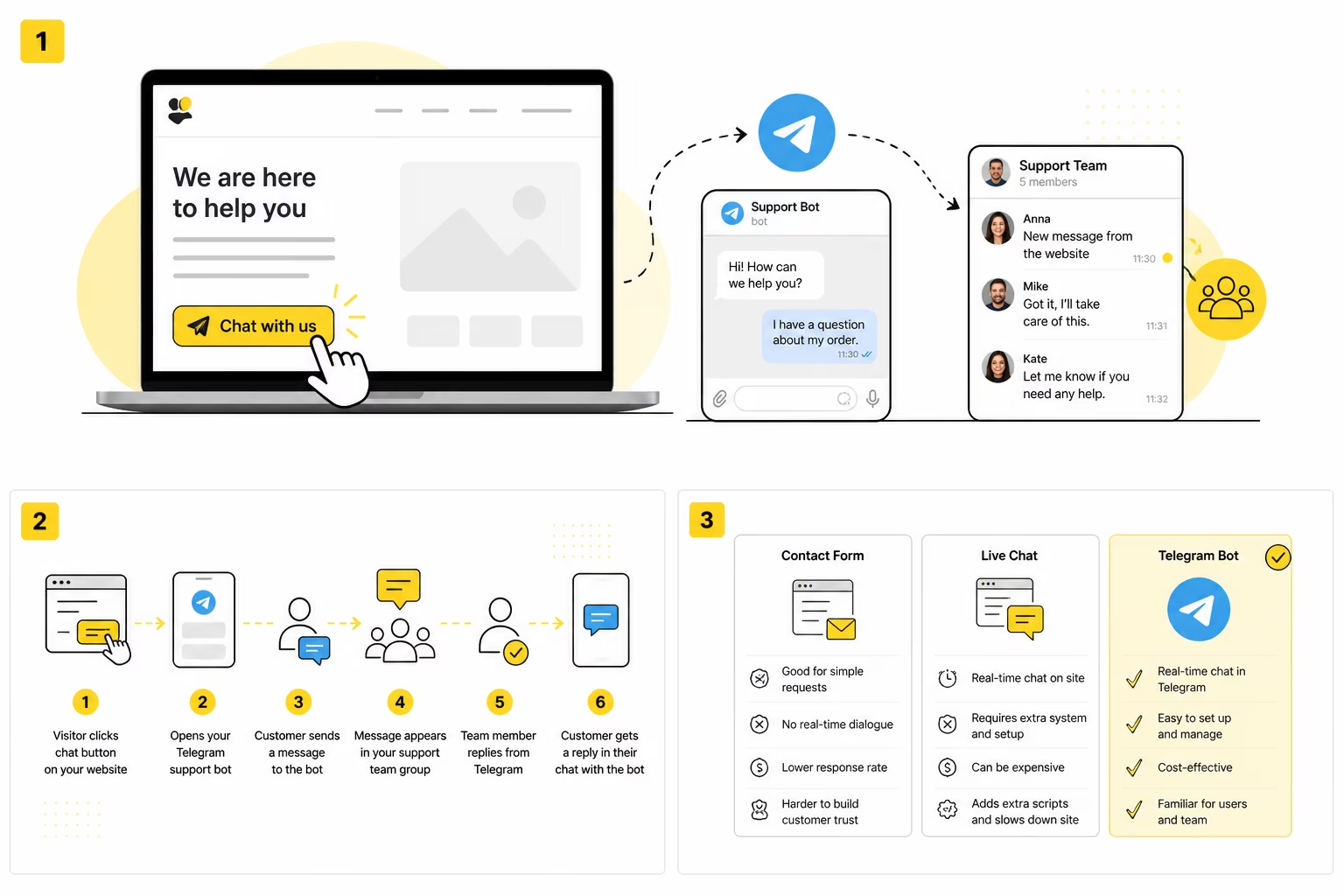
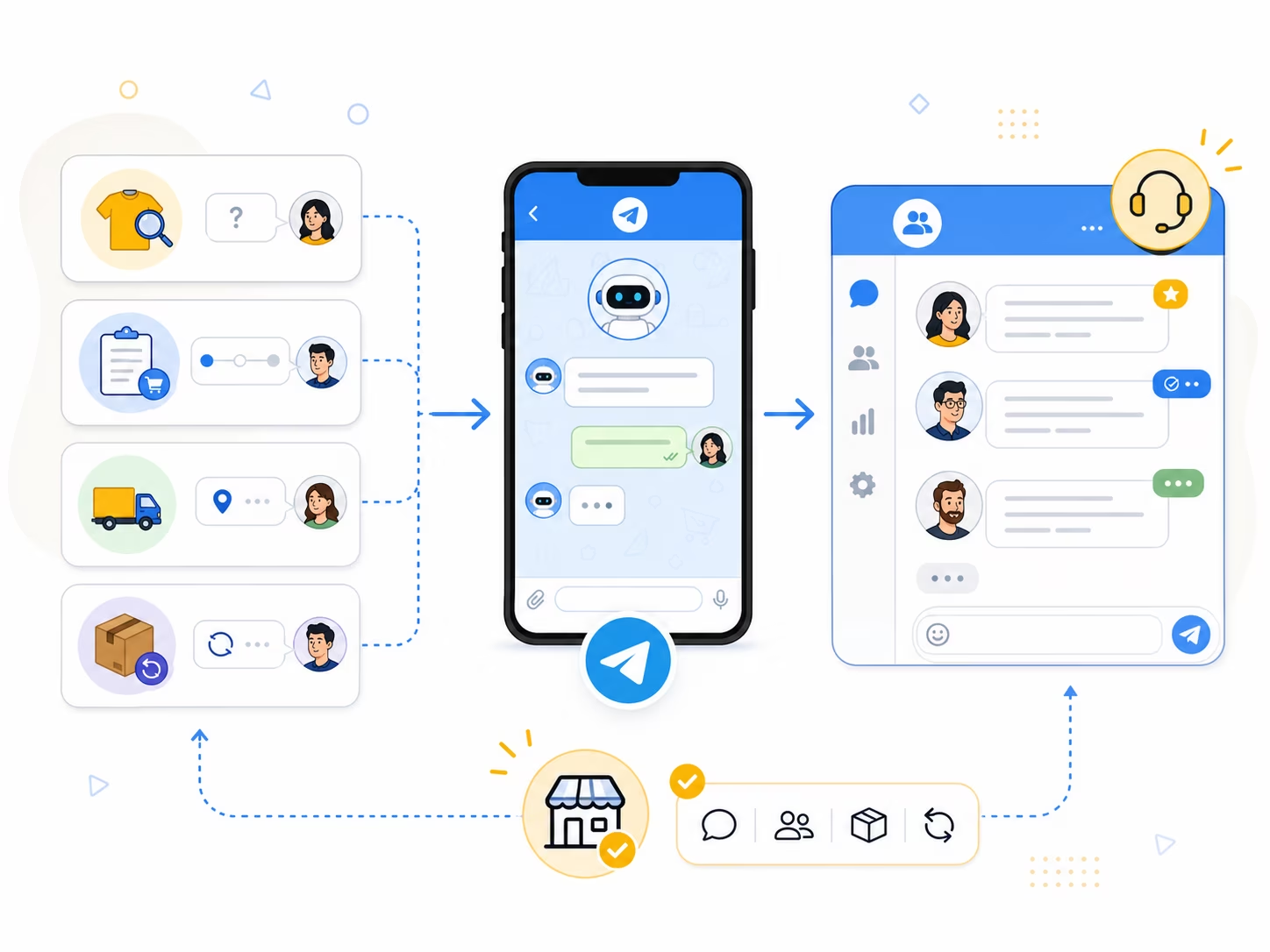
A Telegram bot for ecommerce can work as a lightweight customer support channel: a shopper asks a question through the bot, and your managers reply from one shared team group. This is especially useful for small and growing online stores where customers often ask about product availability, size, delivery, payment, returns or order status, but a full help desk system still feels too heavy. Instead of keeping customer conversations in personal Telegram chats, email inboxes, website forms and order comments, the store can bring incoming questions into one working space. The customer gets a normal Telegram conversation, while the team gets a cleaner process where every request does not turn into “wait, who already replied to this person?”.
| Store situation | How often it happens | What goes wrong without shared support | How a Telegram bot helps |
|---|---|---|---|
| Product availability question | Every day or several times a week | The customer waits while the manager checks personal chats or the admin panel | The question appears in a shared team group |
| Delivery question | Before and after purchase | The customer is unsure about timing and may leave for a competitor | A manager can reply quickly in a familiar messenger |
| Order status question | After payment or shipping | The same questions repeat, and context gets scattered | Replies stay in one conversation with the customer |
| Return or exchange | Less frequent, but sensitive | A wrong answer can create conflict | The team sees the context and can involve the right person |
| Messages after working hours | Evenings, weekends, after ads | Requests get lost until the next day | The message stays in the Telegram group and can be handled later |
Why online store support becomes chaotic so quickly
At the beginning, support in an online store usually feels manageable. One person adds products, answers customers, checks payments, talks to suppliers and tells themselves: “We do not need a CRM yet, I remember everything.” For the first orders, this may actually work, especially when the catalog is small and customers do not write very often. But then ads start running, the catalog grows, delivery becomes more complicated, returns appear, and customers begin asking questions in an order that is very different from your internal workflow. One person asks about availability, another about color, a third one wants faster shipping, and a fourth one writes: “I already paid, where is my order?”.
The real problem is not only the number of messages. The problem is that they arrive from different places. One customer writes through the contact form, another sends a message to a manager’s personal Telegram account, someone replies to an order confirmation email, someone uses WhatsApp, and someone finds the owner directly. The business seems to have support, but there is no single place where the team can see the full picture. If a manager is sick, traveling or simply does not open Telegram in the morning, part of the customer history disappears with them. It sounds funny until the first customer says: “Yesterday you promised to ship it today,” and the team looks at each other like contestants in a quiz show with no correct answer.
For an online store, this kind of confusion is especially dangerous because a customer question is often very close to a purchase. People do not always write after they buy. Very often they write before buying. They are checking details, comparing options and trying to understand whether they can trust your store. If the store replies quickly, the chance of a purchase goes up. If the answer gets lost, the customer will not always wait. They will open another website where the same question is solved in two minutes. In e-commerce, support is not only an after-sales function. It is part of sales.
What customers usually ask before and after an order
Support in an online store rarely starts with something complicated. Most of the time, the customer needs to clarify one simple detail that prevents them from placing an order. Is the item in stock? When can it be delivered? Will this size fit? What is the difference between two models? Can I pay by card? Is pickup available? Can I order today? None of this requires a large CRM, but all of it requires a fast answer. The customer is not writing a novel. They are checking whether buying from you will be easy.
After the order is placed, the questions change. The customer wants to know whether the payment went through, when the order will be shipped, where the tracking number is, whether the delivery address can be changed, and what to do if the courier did not call. These messages are no longer only about conversion. They are about trust. If a customer has paid and does not receive a clear answer, anxiety grows quickly. Sometimes one normal message from a manager is enough to calm the situation and keep the customer loyal. But that only works if the message is noticed in time.
If order updates are your most repetitive request, read how to handle order status questions in Telegram with a lightweight shared workflow.
Returns and exchanges are a separate category. They may happen less often than availability questions, but they create more risk. A vague answer, a lost message or a different promise from another manager can turn a normal support case into a conflict. The store needs context: what the customer ordered, what they asked before, what was already promised and who is responsible for the next step. If all of this is spread across personal chats, email and screenshots, the team starts spending more time searching for the conversation than solving the issue. Use the focused guide to build a clear customer returns and refund support workflow in Telegram.
Delivery questions need the same discipline. Separate confirmed facts from estimates, record who owns the next update and tell the customer when to expect it. The detailed Telegram workflow for delivery questions includes a status model and reusable customer messages.
Why personal chats are not enough for a growing store
Many online stores start with personal messenger communication. A manager puts their Telegram or WhatsApp link on the website, and customers write directly. This is fast, human and easy to launch. For the very first stage, it is not a mistake. It is often better than hiding behind a slow email form. The problem appears later, when the same personal chat becomes a business process. At that point, one person’s messenger turns into a warehouse of customer questions, supplier messages, friend chats, courier updates and random notifications. Somewhere between “Can you send the invoice?” and “Look at this meme,” there may be a customer who was ready to pay.
Personal chats also make teamwork difficult. If one manager spoke with a customer yesterday, another manager cannot easily continue the conversation today. They need screenshots, forwarded messages or a retelling of what happened. This is slow and unreliable. It also creates a strange dependency on one person. If the person who owns the chat is unavailable, the store may technically still exist, but part of the support system is locked in their phone. That is not a process. That is a very small hostage situation with push notifications.
There is also a privacy issue. Customers should not have to contact the personal account of the owner or a specific employee just to ask about delivery. The store needs a business contact point. A Telegram bot gives this separation: the customer sees the store’s support bot, while the team works behind the scenes in a shared Telegram group. The customer does not need to know which manager replies. They only need a clear answer from the store.
How Telegram support can work for an online store
The basic flow is simple. A customer clicks a Telegram button on the website, in the order confirmation page, in the product card or in the contact section. The bot opens, the customer writes a question, and the message appears in the store’s private Telegram group. A manager replies from that group, and the customer receives the answer in their chat with the bot. From the customer’s side, it feels like a normal Telegram conversation. From the team’s side, it becomes a shared support workspace.
This is the main difference between “just put a Telegram link on the website” and using a support bot. A plain link usually sends the customer to one person. A bot can route the conversation to the team. When several managers are involved, this matters a lot. The team can see new questions, understand the context and decide who should answer. If the question is about delivery, one person can reply. If it is about payment, another can help. If it is about a return, the responsible person can join without asking the customer to repeat everything from the beginning.
In GramDesk, this scenario is built around a simple idea: customers write to a Telegram bot, and the team replies from a private Telegram group. For an online store, that means questions from buyers do not have to live in personal accounts. They can become part of a shared support process. You can see this scenario in more detail on the page about customer support for online stores via Telegram.
If several people answer customers, see the team support workflow to avoid duplicated replies.
Bring your store support into Telegram
Customers write to your Telegram bot, while your managers reply from one shared group - no personal chats, lost questions or heavy help desk setup.
Where to place a Telegram support button in an online store
If you need a lightweight entry point first, create a ready-to-paste button with the free Telegram button generator. Point it to the store support bot, then place the button where shoppers already have product, delivery or return questions.
A Telegram support button should not be hidden only in the footer. The footer is useful, but it is not where most purchase doubts happen. Customers need help exactly at the points where they make decisions. On a product page, the button can appear near product availability, size, delivery, payment or the add-to-cart button. On the cart page, it can help users ask about shipping, discounts or checkout problems. On the order confirmation page, it can become a clear channel for delivery and status questions.
The wording matters. A button that says “Telegram” is less clear than a button that says “Ask about this product”, “Check delivery in Telegram” or “Message support”. Customers are not looking for a social icon. They are looking for an answer. The more specific the label, the easier it is for them to act. If you sell clothing, the button can be close to size questions. If you sell appliances, it can be close to delivery and installation. If you sell digital products, it can be near access and payment instructions.
It is also useful to set expectations. You can write something like “We usually reply during working hours” or “Ask us in Telegram before placing an order.” Do not promise instant replies if your team does not actually reply instantly. A broken promise creates more irritation than a modest, honest message. Customers can accept that a small store does not have a 24/7 support team. What they do not like is writing into a “live” channel and hearing silence for half a day.
Telegram, email, WhatsApp or live chat: what should an online store choose?
Email is still useful for invoices, official messages, documents and longer communication. It is not dead, no matter how many times people try to bury it with a shovel made of push notifications. But email is not always the best channel for quick pre-sale questions. A customer who wants to know whether delivery is possible tomorrow probably does not want to start an email thread. They want a short answer and a feeling that the store is alive.
WhatsApp can be very strong if your audience uses it more than Telegram. In many countries, WhatsApp is the default business communication channel, and for some stores it may be the first choice. The downside is the same as with personal Telegram links: without a shared process, messages can easily end up in one employee’s phone. If WhatsApp is important for your audience, it should also be connected to a team workflow, not treated as a private inbox with a green icon.
Classic live chat works well when the store has enough traffic and enough staff to support it properly. It gives a website widget, operator panel, chat history and often automation. But it also adds another system for the team to monitor. For a small store, this can be more than necessary. If the team already works in Telegram, a Telegram support bot may be a better first step: less setup, less training and fewer places to check.
Telegram is not automatically better than every other channel. It is better when your customers are comfortable with it, your team already uses it, and you need a simple shared support flow without introducing a full customer support platform. The best solution may also combine several channels. The important thing is not to collect messages everywhere and answer nowhere. The important thing is to make sure every incoming question has a clear path to the person who can answer it.
When Telegram support is enough, and when you need a help desk
Telegram support is usually enough when the store is small or medium-sized, the team is compact, and most questions are practical: product details, delivery, payment, order status, exchange or return. In this stage, the main problem is not advanced analytics. The main problem is that messages are scattered and nobody is sure who replied. A shared Telegram group with a bot can solve this without creating a heavy support department before the business needs one.
A full help desk becomes more important when the number of requests grows, support has several levels, and the business needs statuses, priorities, SLA rules, tags, reports and strict assignment. If you have hundreds or thousands of support requests every week, Telegram alone may not be enough as the main system. It can still remain a convenient communication channel, but internal processing may need a larger platform. There is nothing wrong with that. Tools should match the stage of the business.
The mistake is to jump too early into a complex system because it looks “serious.” A small store does not become more organized just because it pays for a large support platform. It becomes organized when every message has a place, every employee understands where to reply, and the customer gets a clear answer. Telegram can be a very practical step toward that kind of order.
A simple support setup for an online store
A good starting setup does not have to be complicated. First, choose the main entry points on the website: product pages, cart, order confirmation and contact page. Then add a Telegram support button with clear wording, not just an icon. After that, route customer messages to a private team group instead of one person’s personal account. Finally, agree on basic rules inside the team: who answers product questions, who handles delivery, who checks payments and who deals with returns.
The flow can be very simple:
- The customer clicks a Telegram support button.
- The Telegram bot opens.
- The customer asks about a product, delivery, payment or order status.
- The message appears in the store’s support group.
- A manager replies from Telegram.
- The customer receives the reply in the bot conversation.
This gives the store a basic but real support process. It does not require every manager to learn a new help desk interface, and it does not expose personal accounts to customers. It also keeps the customer experience natural: people ask a question in a messenger and get a reply in the same place. For many small online stores, that is exactly the level of simplicity that makes the system work.
What to avoid when moving store support to Telegram
The first mistake is to use Telegram but keep the same chaos. If the website button sends all customers to one manager’s personal account, the store has not built support. It has just moved the bottleneck from email to Telegram. The second mistake is to create too many chats. One chat for delivery, one for payments, one for product questions, one for VIP clients, one for “temporary urgent things” - and suddenly the team needs a map to find the right conversation. Start simple and separate only what truly needs separation.
The third mistake is to forget about responsibility. A shared group is useful only if people understand who should answer. Otherwise, everyone sees the message, everyone assumes someone else will reply, and the customer receives the most popular support answer in the world: nothing. A basic rule like “the first available manager replies” or “delivery questions go to the logistics manager” can prevent a lot of confusion.
The fourth mistake is to treat Telegram as a replacement for all business systems. Telegram can be a great communication layer, but orders, payments, invoices and stock should still be handled in the proper systems. The bot should help the customer talk to the store. It should not become a messy accounting department with stickers. Keep communication in Telegram, and keep operational records where they belong.
Conclusion: Telegram can make store support simpler
Telegram for e-commerce is not about adding another shiny channel just because everyone likes messengers. It is about making customer communication easier to manage. A buyer asks about a product, delivery or order status in Telegram. The team sees the question in a shared group. A manager replies without switching to a separate support panel. The customer gets a fast, familiar conversation, and the store gets more order than it had in personal chats.
Forms, email, WhatsApp and live chat can all be useful. A form is good for structured requests, email is good for documents, WhatsApp may be essential in some markets, and live chat is powerful for larger support teams. But for a small or growing online store, Telegram support can be the simplest practical step: fast enough for customers, familiar for managers and structured enough for teamwork. It gives the store a real support channel without turning the whole business into a software implementation project.
GramDesk is built exactly for this kind of workflow. Customers write to your Telegram bot, and your team replies from a private Telegram group. This helps online stores keep product questions, delivery discussions, order updates and support conversations in one place. You can see the full scenario on the page about organizing online store customer messages via Telegram.
For a broader comparison of personal chats, email, live chat, and helpdesk tools, read our guide to customer support for small online stores.
Running your store on WordPress? Read the focused setup guide on WooCommerce support via Telegram for a practical flow built for small WooCommerce shops.
Bring your store support into Telegram
Customers write to your Telegram bot, while your managers reply from one shared group - no personal chats, lost questions or heavy help desk setup.