
WooCommerce is one of the easiest ways to turn a WordPress website into an online store. It is flexible, familiar and affordable for small businesses. But customer support often grows in a less organized way. A customer asks about delivery through the contact form. Another one writes to the store owner on Telegram. Someone replies from a personal phone. A refund question appears in email. An order status question is left in a comment or sent through Instagram.
At the beginning, this feels manageable. A small WooCommerce store may only receive a few customer questions per day. But as soon as there are more products, more orders and more repeat questions, support becomes harder to control. The problem is usually not that the store needs a large enterprise helpdesk. The problem is simpler: customer messages need one clear place where the team can see them and reply.
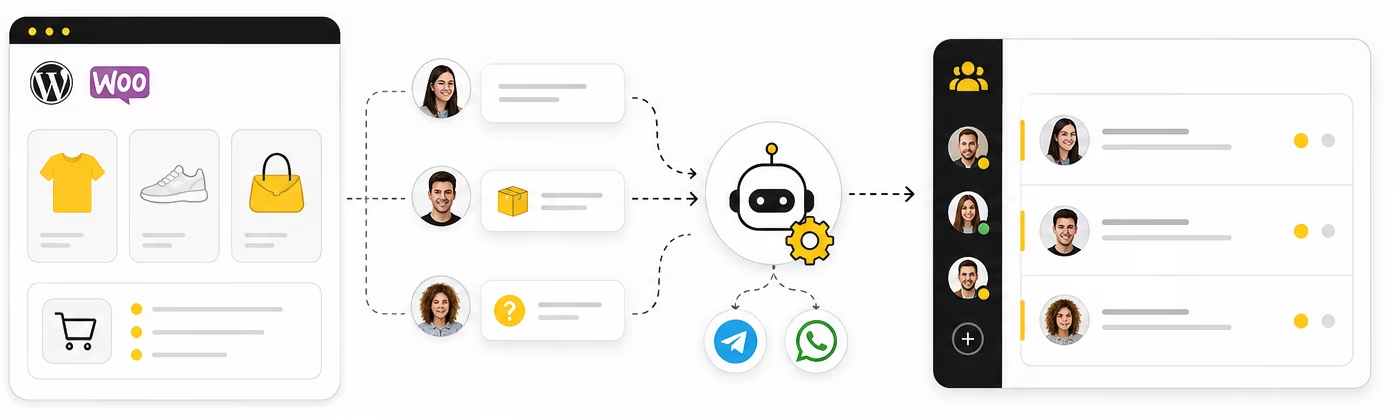
Telegram can be a practical first step for WooCommerce support. Instead of installing a heavy support platform too early, a store can send customer questions to a Telegram support bot and let the team reply from one private Telegram group. The customer gets a normal messenger conversation. The store gets a shared support space.
The same workflow can work not only for WooCommerce, but for any small online store that wants to handle customer questions from Telegram.
For stores where customers prefer WhatsApp, the same support workflow can also be extended later: customers write from WhatsApp, while the team still replies from one Telegram workspace.
Why WooCommerce stores need a simple support flow
WooCommerce gives store owners freedom. You can choose your theme, plugins, payment methods, shipping setup and product structure. But this freedom also means that support is often assembled from many separate tools. The store may have a contact form, email inbox, order notes, direct messages and a phone number. None of them is wrong. The problem starts when there is no single workflow behind them.
For a small WooCommerce store, most support questions are practical. Customers ask whether a product is in stock, when the order will be shipped, whether delivery is available to their city, how to exchange an item, or whether a discount code works. These questions do not always require a ticketing system with SLA rules, complex automations and advanced reporting. They require a fast answer from someone who can check the order or product details.
If the team already uses Telegram every day, it makes sense to bring support closer to the place where the team is already active. That is the main idea behind Telegram-based WooCommerce support: keep the customer conversation simple, but make the internal process more organized.
The common support problem in small WooCommerce stores
Many small stores start with personal communication. The owner publishes a personal Telegram link, WhatsApp number or email address on the website. This is convenient at first because there is no setup. Customers write directly, and the owner replies quickly.
But this setup does not scale well. When support lives inside personal chats, the team cannot see the full context. If another manager needs to answer, they need screenshots or forwarded messages. If the owner is busy, customer questions wait. If someone forgets to reply, there is no shared place where the missed request is visible.
WooCommerce itself stores order data, but it does not automatically solve customer conversation management. Order notes and admin notifications are useful, but they are not the same as a customer support inbox. The store still needs a place where incoming questions can be seen, discussed and answered.
Why a full helpdesk may be too much at the beginning
Tools like Zendesk and Gorgias are powerful. They are built for teams that need structured ticketing, multiple channels, automations, reporting and more formal support operations. For a larger store, this can be the right choice.
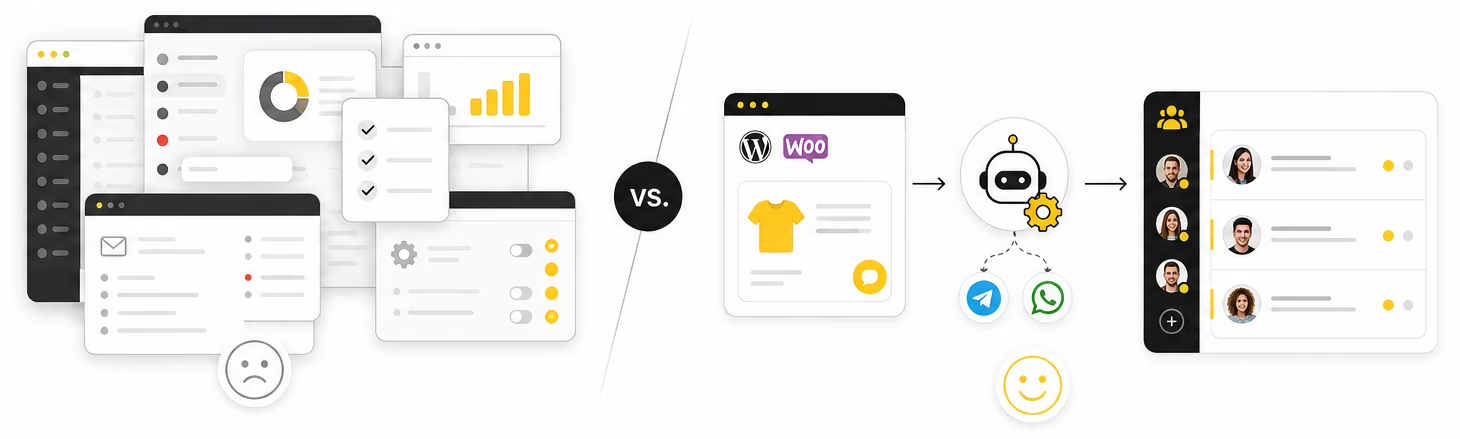
But for a small WooCommerce store, a full helpdesk can be too much too early. It adds another dashboard, another system to configure, another workflow to teach the team, and often another monthly cost that grows with usage, agents or support volume.
The question is not “Is Zendesk good?” or “Is Gorgias good?” The better question is: does your store need that level of system right now?
If your support volume is still moderate and your team mainly needs to stop losing questions, Telegram can be a lighter starting point. It will not replace every advanced helpdesk feature. But it can solve the first and most painful problem: bringing customer messages into one shared place.
What Telegram can do for WooCommerce support
A Telegram support bot can work as a simple customer entry point. The store places a support button on product pages, the contact page, the order confirmation page or the footer. When a customer clicks it, they open a conversation with the bot and ask their question.
Behind the scenes, the message appears in a private Telegram group where the team works. Each customer conversation can be kept separate, so managers do not mix different buyers in one chaotic chat. The team can reply, discuss the issue internally if needed, and keep the conversation visible to everyone who supports the store.
This is especially useful for everyday WooCommerce questions:
- product availability;
- delivery timing;
- payment questions;
- order status;
- returns and exchanges;
- product compatibility;
- questions before checkout;
- questions after purchase.
For the customer, nothing feels complicated. They simply write in Telegram. For the store, the important change is internal: the conversation is no longer hidden in one person’s private inbox.
What if customers prefer WhatsApp?
Telegram can be the internal workspace for the team, even if not every customer wants to contact the store through Telegram. For many WooCommerce stores, WhatsApp is the more familiar customer channel. In that case, the support flow can be extended: the customer writes from WhatsApp, and the team replies from the same private Telegram group.
This is useful when you want to keep the team inside Telegram but give customers a channel they already use. The store does not need to force every buyer to install or use Telegram. Telegram becomes the support inbox for the team, while WhatsApp can remain one of the customer-facing contact options.
For example, a WooCommerce store can keep a Telegram button on product pages and also offer WhatsApp for customers who prefer it. The team does not need to split work between multiple personal phones. Messages can still be handled from one organized Telegram workspace.
A simple WooCommerce + Telegram support setup
A simple setup can look like this:
- The WooCommerce store adds a “Contact us in Telegram” button.
- The customer opens the Telegram bot and sends a message.
- GramDesk forwards the message to a private support group.
- The team sees the customer conversation and replies from Telegram.
- The customer receives the answer in the same Telegram chat.
This setup is not meant to turn WooCommerce into a complex CRM. It is meant to create a reliable support path for small stores that need order and product questions handled faster.
The same idea can work with WhatsApp as an additional channel. The customer may write from WhatsApp, but the team can still reply from Telegram. This lets the store support customers in a familiar channel without changing where your team works.
Where to place the Telegram support entry points
The support button should appear where customers usually hesitate or need help. In WooCommerce, these points are easy to identify. A customer may need help before purchase, during checkout or after placing an order.
Good places for a Telegram support entry point include:
- product pages, for pre-sale questions;
- cart page, for checkout doubts;
- order confirmation page, for post-purchase questions;
- contact page, for general support;
- footer, for always-visible access;
- email templates, for order-related follow-up.
The button text should be clear. Do not use only a Telegram icon. Use wording such as “Ask us in Telegram”, “Order question? Message us”, or “Need help with your order?”. Customers should understand what will happen after they click.
You can also create a simple Telegram support button and place it on product pages, the contact page or the order confirmation page.
If WhatsApp is also available, do not overload every page with too many competing buttons. Use Telegram as the main structured support path for your team, and offer WhatsApp where it clearly helps conversion or customer trust.
What customer questions should go to Telegram
Not every action has to become a Telegram conversation. Some things should stay automatic inside WooCommerce: order confirmation emails, payment status, shipping notifications and invoice emails. Telegram is better for questions that need a human answer.
A good rule is simple: if the customer is uncertain and may leave the website, offer Telegram. If the question is sensitive and needs context, route it to Telegram. If the answer is purely automatic, keep it inside WooCommerce emails or website content.
For example, a product page can answer standard questions with description, size table, delivery information and FAQ. But if the customer still asks “Will this arrive before Friday?” or “Is this model compatible with my setup?”, that is a good Telegram support moment. A fast reply can save the order.
Telegram is also useful after purchase. Customers often do not want to search through old emails to check order details. If they have a simple place to ask about delivery, returns or product setup, the store can reduce frustration and protect repeat purchases.
When Telegram is enough and when you need Zendesk or Gorgias
Telegram-based support is usually enough when the store is small or medium-sized, the team is compact, and the main problem is scattered communication. If you only need a shared place to receive questions and reply quickly, a Telegram support bot can be much simpler than a full helpdesk.
A dedicated helpdesk becomes more useful when you need advanced ticket statuses, SLA rules, detailed analytics, macros, escalation levels, complex automation, multi-channel reporting or a large support team. At that stage, Zendesk, Gorgias or another helpdesk may become the right tool.
The mistake is to buy a large system before the store has a large support process. A small WooCommerce shop does not become more organized just because it adds a big helpdesk. It becomes more organized when every customer message has a clear path, every team member knows where to reply, and customers get answers before they lose interest.
Telegram is a lightweight middle step. It gives the store more structure than personal chats, but without the setup and cost of a full helpdesk.
Practical setup checklist
Before adding Telegram support to a WooCommerce store, check these points:
- Decide which pages should show the Telegram support button.
- Use clear button text, not only an icon.
- Keep customer support separate from the owner’s personal Telegram account.
- Route messages into a private team group.
- Make sure more than one person can see incoming questions.
- Create simple rules for who replies to order, delivery and return questions.
- Keep standard WooCommerce emails for automatic order updates.
- Use Telegram for questions that need a human response.
- If many customers prefer WhatsApp, consider connecting WhatsApp as an additional customer channel while keeping Telegram as the team inbox.
- Review the setup after a few weeks and see what questions repeat most often.
This is enough for many small stores. You do not need to build a complete support department on day one. You need a clean path from customer question to team reply.
Final thoughts
WooCommerce is a good platform for small stores because it does not force every business into the same structure. Your support setup can follow the same principle. You do not have to start with a heavy helpdesk if your real problem is missed messages and slow replies.
Telegram support is a lightweight way to make WooCommerce customer communication more organized. Customers can ask questions in a familiar messenger, and your team can reply from one shared Telegram workspace. If your buyers prefer WhatsApp, that can also become part of the same support flow without changing where your team works.
If you want a broader overview of this workflow, read our guide to Telegram for e-commerce support. If you want to see the practical use case, see how GramDesk helps organize online store support in Telegram.
WooCommerce support does not have to start with a heavy helpdesk. With GramDesk, your store can receive customer questions from Telegram, optionally connect WhatsApp, and let the team reply from one shared Telegram workspace.
WooCommerce support without heavy helpdesk setup
Connect your bot, keep store questions organized, and let your team reply from one private Telegram workspace.
FAQ
Can I use Telegram for WooCommerce customer support?
Yes. A WooCommerce store can use a Telegram bot as a simple support entry point. Customers write to the bot, and the team replies from a private Telegram group. This is useful for order questions, delivery details, returns and pre-sale product questions.
Is Telegram enough for a small WooCommerce store?
For many small stores, yes. If the main problem is scattered messages and slow replies, Telegram can be enough as a lightweight shared inbox. A full helpdesk becomes more useful later, when you need advanced ticket statuses, analytics, macros, SLA rules or a larger support team.
Can customers contact my WooCommerce store from WhatsApp?
Yes, WhatsApp can be connected as an additional customer-facing channel. In that setup, customers can write from WhatsApp, while the team continues to reply from Telegram. This is useful if your buyers already prefer WhatsApp but your team wants one internal workspace.
Is this a replacement for Zendesk or Gorgias?
Not completely. Zendesk and Gorgias are full helpdesk platforms for more advanced support operations. Telegram support is a simpler option for small WooCommerce stores that need fast replies, shared visibility and a lower setup burden.
Where should I place the Telegram support button in WooCommerce?
The best places are product pages, the cart page, the order confirmation page, the contact page, the footer and selected email templates. The button should appear where customers usually have questions before or after purchase.