
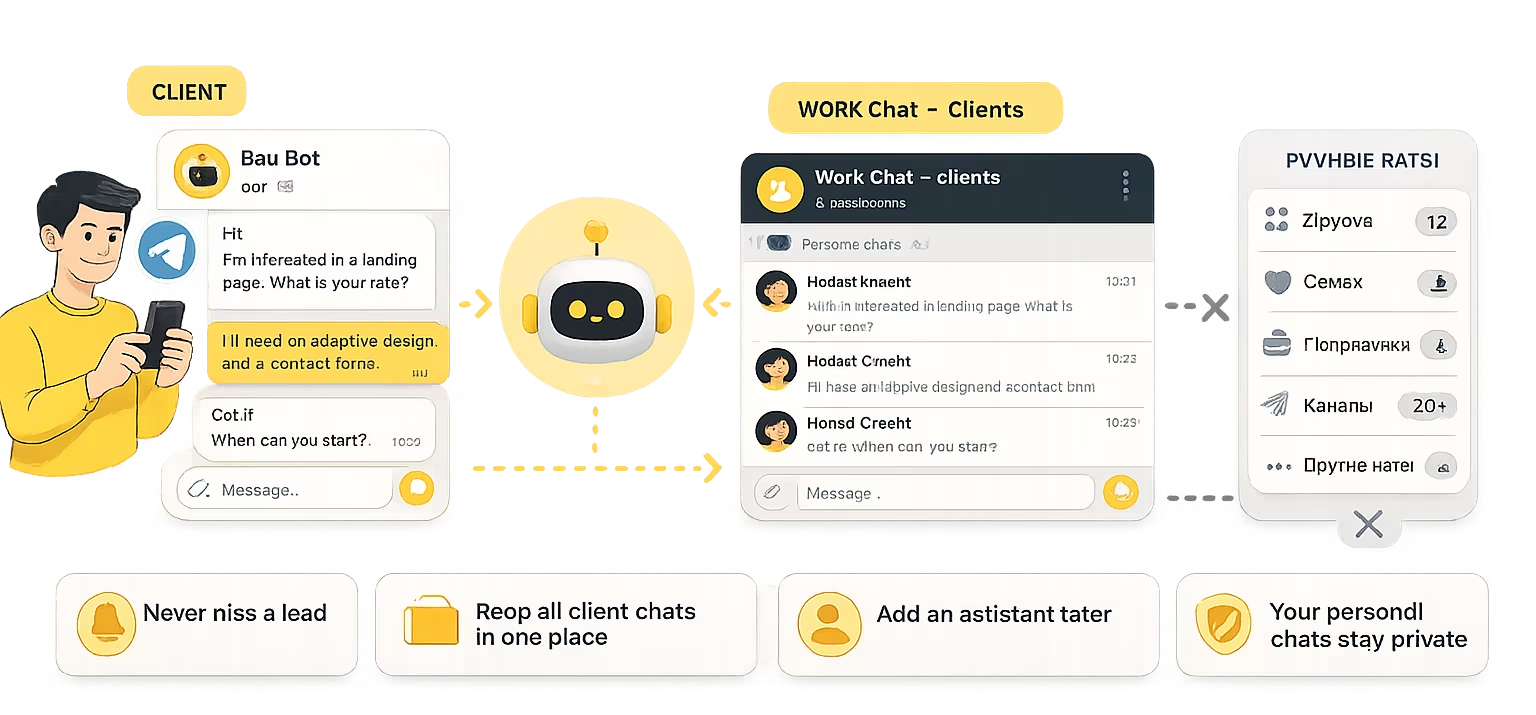
It is easy for a freelancer to lose a lead in Telegram when every client writes to a personal account together with friends, contractors, channels, banks and everyday chats. At first, this feels convenient: a client messages you directly, you reply quickly, agree on the task and start working. But when the number of requests grows, personal Telegram turns into an unofficial CRM without statuses, reminders or a proper separation between personal and work communication. To stop losing leads, a freelancer does not need to implement a complex support system right away - it is often enough to move incoming client messages into a separate work channel, for example through a Telegram bot.
| Problem | What it looks like for a freelancer | What helps |
|---|---|---|
| A lead moves down in the chat list | A client writes, you decide to answer later, then new messages arrive | A separate work channel for incoming requests |
| Personal and work messages mix together | Clients, friends, channels, contractors and personal notifications sit side by side | Separating client messages from personal Telegram |
| It is hard to remember the context | A client returns after a month, and you have to search the old conversation manually | One place for client conversations |
| You cannot easily add an assistant | All requests are inside your personal account, and you cannot give access to it | A work space where an assistant can be added |
| Personal Telegram becomes a public contact | Your username appears on your website, portfolio and client messages | A link to a Telegram bot instead of a personal profile |
Why personal Telegram works well at first
Personal Telegram really is convenient at the beginning. A freelancer does not need to buy a CRM, set up a form, connect a separate service or build a complex lead system. You give a client your username, receive a message, reply, agree on a call or discuss the task right away. For the first projects, this is almost the perfect scenario, because the main goal is to start the conversation quickly and avoid unnecessary barriers. This is especially true when the client comes through a recommendation and already roughly understands why they are contacting you.
The problem is that freelancing rarely stays in the “two clients and one project” stage. Gradually, repeat customers appear, old clients return with new tasks, someone asks about pricing, someone needs a payment link, someone asks about timing, and someone writes three months later: “Do you remember, we discussed a similar task?”. At the same time, ordinary life continues in the same Telegram account: friends, family chats, channels, banks, services, contractors, news and messages that have nothing to do with work. At some point, a client lead becomes just one of many bubbles in the same general stream.
For a freelancer, this is dangerous not only because it creates disorder, but also because it directly affects income. A missed lead can be a project for several days, a long-term contract or a repeat client who already trusts you. At the same time, the loss almost never looks dramatic. The client does not write: “You did not answer, so I went to another specialist.” They simply disappear. And you may not even realize that you lost work, because Telegram does not show a weekly report called “missed money.”
Where leads actually get lost
Most often, leads get lost at the moment when you see the message but do not reply immediately. This is a normal situation: you may be in a meeting, working on a task, commuting or simply not have the energy for a new conversation. Mentally, you put a checkmark on it: “I will reply later.” But Telegram does not know how to hold your mental checkmarks. An hour later, new messages arrive, the chat moves down, personal things appear in the evening, and in the morning another task begins. A couple of days later, you suddenly remember that someone asked about a project, but it is already too late.
The second point of loss is old dialogs. A freelancer can work with several clients at the same time, and each has their own story: pricing was discussed, deadlines changed, files were sent, revisions were agreed on, calls were moved. When all of this sits in personal Telegram, context has to be pulled out manually. A client writes “let’s continue,” and you first have to understand what exactly should be continued. If there are several such conversations, the working day starts to feel less like doing the work and more like excavating your own chat history.
The third point is switching between roles. A freelancer does not only do the work. They also sell, consult, support, remind, issue invoices, receive revisions and answer organizational questions. In personal Telegram, all of these roles mix together. You may reply to a potential client, then to a friend, then to a contractor, then read a channel, then return to the task and no longer remember where you stopped. As a result, the messenger seems to speed up communication, but at the same time it cuts your attention into small pieces.
Why freelancers do not always need a CRM
When a freelancer starts losing messages, the first thought is often: “Maybe I need a CRM.” Sometimes this is true. If you have a long sales funnel, many leads, several deal stages, regular follow-ups, a team and dozens of active clients, a CRM can be useful. It helps you see statuses, tasks, deals, amounts and history. But if the problem is only that client messages have mixed with personal chats, a CRM may be too heavy as the first step.
A CRM has a cost not only in money, but also in attention. It has to be chosen, configured, filled in, maintained and updated regularly. A freelancer often buys a tool and then continues replying in Telegram because that is more convenient for clients. As a result, there is now one more place where information has to be copied manually. If your discipline is strong, this may work. If not, the CRM turns into a beautiful empty dashboard, while real life still happens in messages.
So before choosing a CRM, it is useful to ask a simpler question: do you need a full sales system, or do you first need to separate incoming client messages from personal Telegram? If it is the second one, you can start with a lighter solution. For example, create a separate Telegram bot for clients and route requests into a work space. This does not replace CRM where CRM is really needed, but it solves the basic problem: leads no longer live next to personal chats.
A separate work channel as an intermediate solution
Freelancers often do not need a large help desk, but they do need a separate entry point for clients. The setup can be simple: the client writes not to the personal account, but to a Telegram bot; the message goes into a work space; the freelancer replies there, without mixing the request with personal conversations. For the client, this remains normal Telegram communication. For the specialist, it becomes a separate work flow where it is easier to see new requests and return to old dialogs.
This approach is especially useful if you have a website, portfolio, service page or public profile. Instead of placing your personal username there, you can place a link to a Telegram bot. The client can still message you quickly in a messenger, but they do not enter your personal account directly. This helps preserve boundaries and makes communication slightly more professional. You do not become a “corporation with a robot.” You simply stop using personal messages as the only door into your business.
If the main pain is exactly the mixing of personal and work communication, read the separate article on how to separate work chats from personal chats in Telegram. It explains in more detail why a personal account works poorly as a permanent client channel and how a separate bot helps preserve privacy.
Stop losing leads in personal Telegram
Launch GramDeskBot: clients will write to a separate work channel, while you can reply from Telegram without chaos in personal chats.
How this can work without unnecessary automation
You do not need to build a complex system right away. At the first stage, it is enough to decide which messages should go into a work channel. For example, new leads, pricing questions, deadline discussions, consultation requests and repeat messages from old clients. All of this can be routed through a Telegram bot. Personal conversations, friendly chats and non-work discussions stay in your personal account. The main change is not technical, but organizational: incoming client messages get their own place.
The client path stays simple. A person sees the button “Discuss a project in Telegram” on your website or portfolio, clicks it, opens the bot and writes a question. You receive the request in your work space and reply. If the client returns in a week or a month, the history stays in the same flow. If there are more leads later, you can add an assistant or manager who helps with first-line questions. At the same time, your personal Telegram does not turn into a shared work account.
In GramDesk, this scenario is built exactly for such cases: the client writes to a Telegram bot, and you reply from a private work space in Telegram. This is not about replacing your expertise with automation, and it is not about a soulless chatbot that asks the client to “clarify the request” five times in a row. It is about a normal entry point for clients, so leads do not get lost in personal messages. You can see the product scenario on the page about Telegram support for freelancers.
If your main concern is privacy, the separate personal and work messages workflow shows how customers can contact a bot instead of your private account.
What to put on your website, portfolio or profile
A Telegram contact is better presented not as a username, but as a clear action. For example: “Discuss a project in Telegram,” “Ask a question about the task,” “Request a project estimate,” or “Message about cooperation.” The user should understand what will happen after the click. If you write only “Telegram,” it looks like a social icon. If you write “Discuss a project,” it becomes a work-focused call to action.
On a website or portfolio, the button should be placed where the person is already interested in the service. Near the work description, after case studies, next to the pricing block, at the end of a service page or near a request form. Do not hide the contact only in the footer. The footer is useful, but it works more like a reference section than a decision point. If a client has read a price or a case study, that is usually where they ask: “Is my project similar?”, “How much would it cost?”, “When can we start?”
If you already have a website and are thinking about how to receive requests without a heavy live chat widget, read the article how to add customer support chat to a website without Live Chat. It explains when a form, live chat and Telegram bot fit different situations, and why for a small project a messenger is often simpler than a separate support dashboard.
What alternatives freelancers have
The first alternative is to keep everything in personal Telegram and simply become more disciplined. You can pin important chats, use folders, set reminders, archive unnecessary chats and check messages on a schedule. This can help if there are not many leads and you are really ready to maintain order. But this does not solve the main problem: the client still writes to your personal account, and work messages still live inside your personal life. It is like cleaning the kitchen table, but continuing to hold all work calls on it.
The second alternative is to use a website form. A form is good for structured requests: name, email, task description, budget, deadline and links. It helps collect inputs and filter out completely random questions. But a form works worse for short clarifications. A potential client may not want to fill in fields just to ask “can we start this week?” or “do you work on projects like this?”. That is why a form and a Telegram bot can work together: the form is for detailed requests, Telegram is for fast contact.
The third alternative is email. It works well for documents, contracts, invoices, detailed discussions and official correspondence. But email is often slower as a first-contact channel. It is easier for a client to send a short message in Telegram than to write an email with a subject and structure. It is also easier for a freelancer to reply quickly in a messenger, especially if the question is simple. So email is better kept for the formal part, while incoming questions can go through a faster channel.
The fourth alternative is a CRM or help desk. This is a serious option if you already have a stream of leads, a team, statuses, repeat sales and multiple stages. But for a solo specialist, such a tool may be excessive. You do not always need a sales management system. Sometimes you only need a separate door for clients, so they do not walk directly into your personal messages.
When a freelancer needs a team setup
Freelancing often starts as one-person work, but assistants gradually appear around the specialist. A designer involves a developer, a developer hires an assistant, a marketer works with a copywriter, a consultant hires an administrator for first-line messages. At this point, personal Telegram becomes especially inconvenient. You can no longer just keep everything in your own messages, because some information is needed by other people, but access to your personal account cannot be shared.
If the work channel is already separated from the personal account, adding an assistant is much easier. They can see new requests, help collect inputs, answer typical questions, prepare documents or pass only important dialogs to you. The client continues to write to one clear channel instead of jumping between the owner, assistant and contractor. It is easier to make this transition in advance, while there are not too many leads yet, than to untangle accumulated chaos later in a panic.
If several people already participate in replying to clients, the next topic is team customer support in Telegram. That article explains in more detail how to organize a shared group, roles, responsibility and conversation history when support is no longer handled by one person.
Common mistakes that get in the way
The first mistake is adding a Telegram bot but continuing to give clients your personal username. As a result, some people write to the bot, some to personal messages, some to an old chat, and no order appears. If you decide to move incoming requests into a separate channel, you need to gradually update public links and message templates. Otherwise, the old chaos simply gets a new neighbor.
The second mistake is making the bot too “bot-like.” A freelancer does not need to force the client through a long scenario of ten questions if the task is simple. At the first stage, it is better for the bot to be an entry door, not a form that feels like a government portal. The client writes - you see it - you reply. Later, you can add a greeting, quick hints, email collection or a link to a brief, but the first contact should not become a test of patience.
The third mistake is not explaining why the new channel exists. If an old client is used to writing to you directly, a sudden phrase like “now only through the bot” may sound rude. It is better to explain calmly: “To make sure your message does not get lost and I can see new requests faster, please write to the work Telegram chat.” Clients usually accept such a transition well if they understand the benefit and actually receive a reply.
A minimal transition plan
You can start without a big implementation project. First, decide which types of messages should go into the work channel: new leads, project questions, estimate requests and repeat inquiries. Then create a Telegram bot and connect it to a work space. After that, replace your personal username in public places with the bot link. Old active conversations can be finished where they already started, while new ones gradually move into the separate channel.
Next, it is important to build your own habit. The new work channel has to be checked regularly, otherwise it will not solve the problem. You can pin the group, enable notifications, define a time for processing incoming requests and create a simple rule: new leads do not stay unanswered longer than a certain time. Even if you cannot give a detailed reply immediately, you can write briefly: “I saw your message, I will come back with details tomorrow.” For the client, this is better than silence.
The minimal setup looks like this:
- Create a Telegram bot for client requests.
- Connect it to a separate work space.
- Add the bot link to your website, portfolio and profiles.
- Use clear wording: “Discuss a project in Telegram.”
- Receive new leads through the bot.
- Finish old active dialogs in the current chats.
- When workload grows, add an assistant to the work space.
This process does not turn a freelancer into a large company. It simply helps stop losing incoming requests. For the client, almost nothing changes: they still write in Telegram and get a reply. For you, the most important thing changes - client messages no longer mix with personal life.
What to read next
- If the main problem is that personal Telegram has become a work reception desk, start with how to separate work chats from personal chats in Telegram.
- If you want to add a Telegram contact to a website or landing page, read how to add customer support chat to a website without Live Chat.
- If you already work with an assistant, manager or contractors, read team customer support in Telegram.
- If you have several projects or business directions, the next step may be managing support for multiple projects in Telegram.
Conclusion: freelancers need order in incoming messages, not another heavy system
A freelancer does not always need a CRM, help desk or complex support system. Often, the first and most important task is simpler: stop losing leads in personal Telegram. When clients write into the same stream as friends, channels and contractors, even a careful specialist will eventually miss something. This is not a question of professionalism. It is a question of process design. If incoming messages are not separated, they will mix.
A Telegram bot gives freelancers an intermediate solution between personal message chaos and a heavy system. The client writes in a familiar messenger, but not to your personal account. You reply from a work space, see requests separately and can later add an assistant. This keeps communication human, but adds order where previously there was only memory and hope.
GramDesk helps organize this kind of work channel without a complicated setup. Clients write to a Telegram bot, and you reply from a separate space in Telegram. See the scenario for Telegram support for freelancers or try GramDeskBot right away to check how this approach can work for your leads.
Stop losing leads in personal Telegram
Launch GramDeskBot: clients will write to a separate work channel, while you can reply from Telegram without mixing everything with personal chats.